CSL JSON · RDF
Zotero
Your whole library comes across; an RDF export brings the PDFs too, indexed so the AI can search inside them.
Verital is a desktop research workbench for graduate students. Read the literature, manage citations, run experiments and record lectures, all on your own computer. Every sentence of an AI answer links back to the line it read; every number links back to the run that produced it. When it can’t, it tells you.
Papers, recordings, slides, handwriting, tables, experiment logs, your own drafts: all of it is stored on your computer. For each answer the AI takes only the few passages it needs, never the whole folder.
Ask how Darwin describes the Galápagos finches on this page. Each sentence of the answer carries the passage it read.
He writes that the finches are “far preponderant over any other family of birds”[1], and that the share of all-black birds is “exceedingly small”[2].
[1] Darwin, Ornithological Notes (1836), p. 72, lines 3–5 [2] Same page, lines 9–10Click [1] and you are on page 72 of the 1836 manuscript, with the cited lines lit. A sentence that can’t be matched is held back. It never becomes a reference that only looks real.
“Hence these Finches are in number of Species & individuals far preponderant over any other family of birds.”
Text transcribed from page 72 of Darwin’s 1836 Ornithological Notes.
The journal wants Word, you hand in Word; it wants LaTeX, you hand in LaTeX. Most journals in the social sciences, medicine, nursing and the humanities take .docx, which you edit right in the app. Engineering journals and arXiv take LaTeX, compiled by the real Tectonic engine. Typst shows the typeset page as you type. And if you would rather not think about layout at all, draft in Markdown and let LaTeX typeset the PDF. Save As converts between the four, so switching journals does not mean retyping.
The submission format of most journals in the social sciences, medicine and the humanities. The app has a real Word editor, and a journal’s Word template applies directly.
Engineering journals and arXiv. Real Tectonic compilation and the official .cls templates, not an approximate preview.
The fastest live typesetting: it redraws only the blocks you are looking at, so the laid-out page keeps up with your typing.
Plain-text drafting, the easiest format to move between tools; when you export a PDF, LaTeX does the typesetting.
No fixed direction: switch between Markdown, Typst, LaTeX and Word whenever you like, and switch back again. Headings, lists, tables and equations come along. Only exporting the PDF is one-way.
## Methods

We followed **412 adults** with type 2 diabetes for twelve months and compared two education programmes.

| Group | n | HbA1c drop |
|---|---|---|
| Standard | 206 | 0.4% |
| Personalised | 206 | 0.9% |

The main effect was estimated with a mixed model: $\Delta = \beta_1 t + u_i$.
\section*{Methods}

We followed \textbf{412 adults} with type 2 diabetes for twelve months and compared two education programmes.

\begin{center}\small
\begin{tabular}{lll}
\hline
\textbf{Group} & \textbf{n} & \textbf{HbA1c drop} \\
\hline
Standard & 206 & 0.4\% \\
Personalised & 206 & 0.9\% \\
\hline
\end{tabular}
\end{center}

The main effect was estimated with a mixed model: $\Delta = \beta_1 t + u_i$.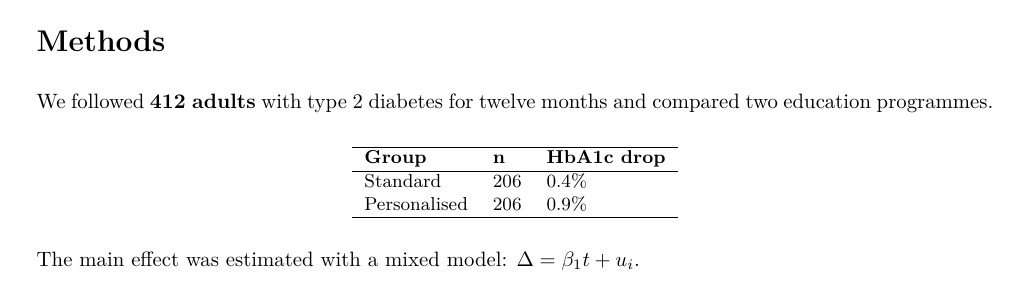
You do not need to know LaTeX to hand in a LaTeX manuscript. Left: a public-health draft in Markdown. Middle: the same draft as LaTeX; switch it back to Markdown, or on to Typst or Word, whenever you like. Right: the PDF it compiles to. Unedited converter output.
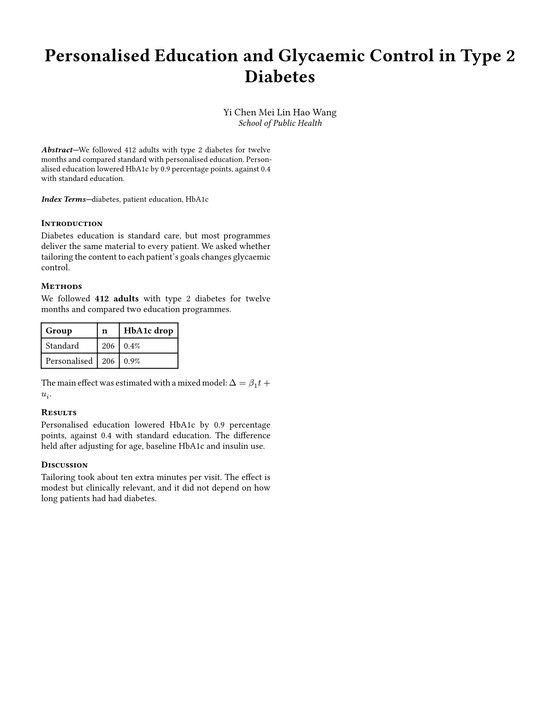
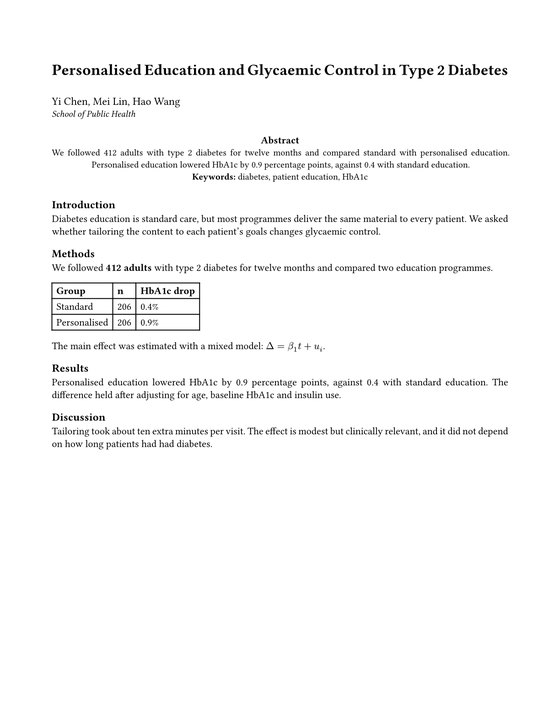
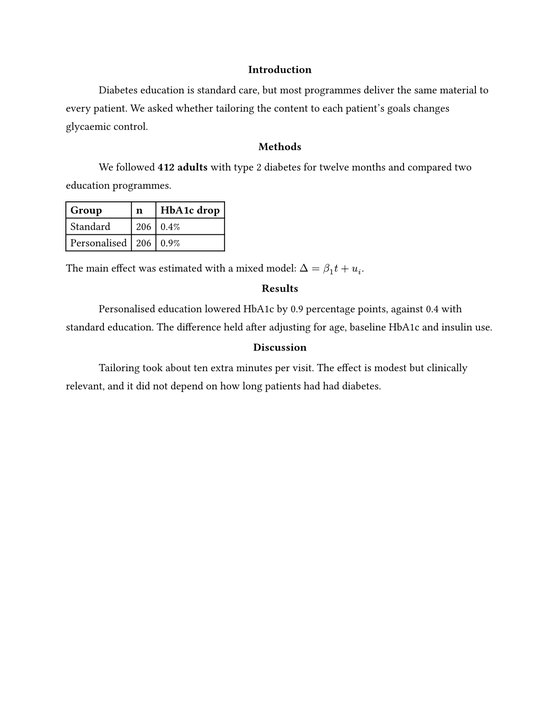
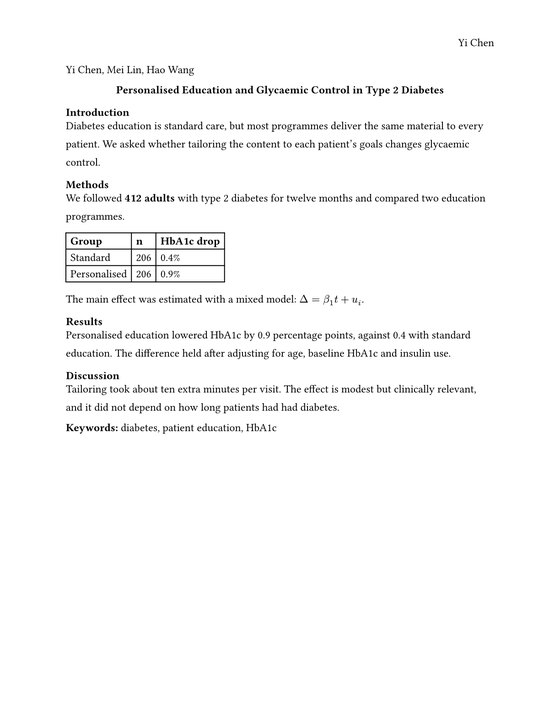
These four pages are one public-health draft, typeset by the app in the IEEE, Elsevier, APA 7 and Chicago templates. Nothing was adjusted by hand.
21 built in, including APA 7, Chicago, MLA, theses, Elsevier, Springer Nature, IEEE, ACM and NeurIPS. Online there are the official packages of journals and conferences, CTAN classes and all of Typst Universe, fetched from the official source the first time you pick one. An official LaTeX template rewrites your source directly; a Word manuscript takes on the journal’s Word layout.
One request rearranges a Typst manuscript into what the journal asks for: sections, abstract, figure and table numbering, citation style. A version is saved first, and a change that does not compile is not applied.
The typeset page is rendered and shown to the model: figures wider than the column, overlapping blocks, broken equations, missing sections, listed one by one. Applying a template also tells you what did not fit.
Switch styles and every in-text citation and the reference list change together. What you see is the app’s actual output.
Discussion
Personalised education lowered HbA1c by 0.9 percentage points, against 0.4 with standard education (Chen et al., 2024)(Chen, Lin, and Wang 2024)[1].
References
Chen, Y., Lin, M., & Wang, H. (2024). Personalised education and glycaemic control in type 2 diabetes. Diabetes Care, 47(3), 412–420.Chen, Y., M. Lin, and H. Wang. 2024. "Personalised education and glycaemic control in type 2 diabetes." Diabetes Care 47 (3): 412–420.[1] Y. Chen, M. Lin, and H. Wang, "Personalised education and glycaemic control in type 2 diabetes," Diabetes Care, vol. 47, no. 3, pp. 412–420, 2024.
Change a word, check the PDF: hundreds of times on deadline night. We rebuilt the Tectonic engine into the app, so a four-section paper becomes a PDF in 0.3 s, and Typst redraws only the blocks you are looking at.

\subsubsection{Scaled Dot-Product Attention}
We compute the attention function on a
set of queries simultaneously:
\begin{equation}
  \mathrm{Attention}(Q,K,V) =
  \mathrm{softmax}\left(\frac{QK^{T}}{\sqrt{d_k}}\right)V
\end{equation}
We compute the attention function on a set of queries simultaneously:
The two most commonly used attention functions are additive attention and dot-product attention.
Measured on the same Apple silicon Mac, Aug–Sep 2026.
A puzzle outline decides what each page has to say. Every generated page is then laid out against a design system rather than poured into a template; the paper’s own figures are cut out and placed, and diagrams are drawn as shapes you can edit.
Step one, the puzzle: the test build read the paper and laid out these 7 sections and 12 cards, with 2 more in the tray. Move cards, add sections, or leave it and generate.
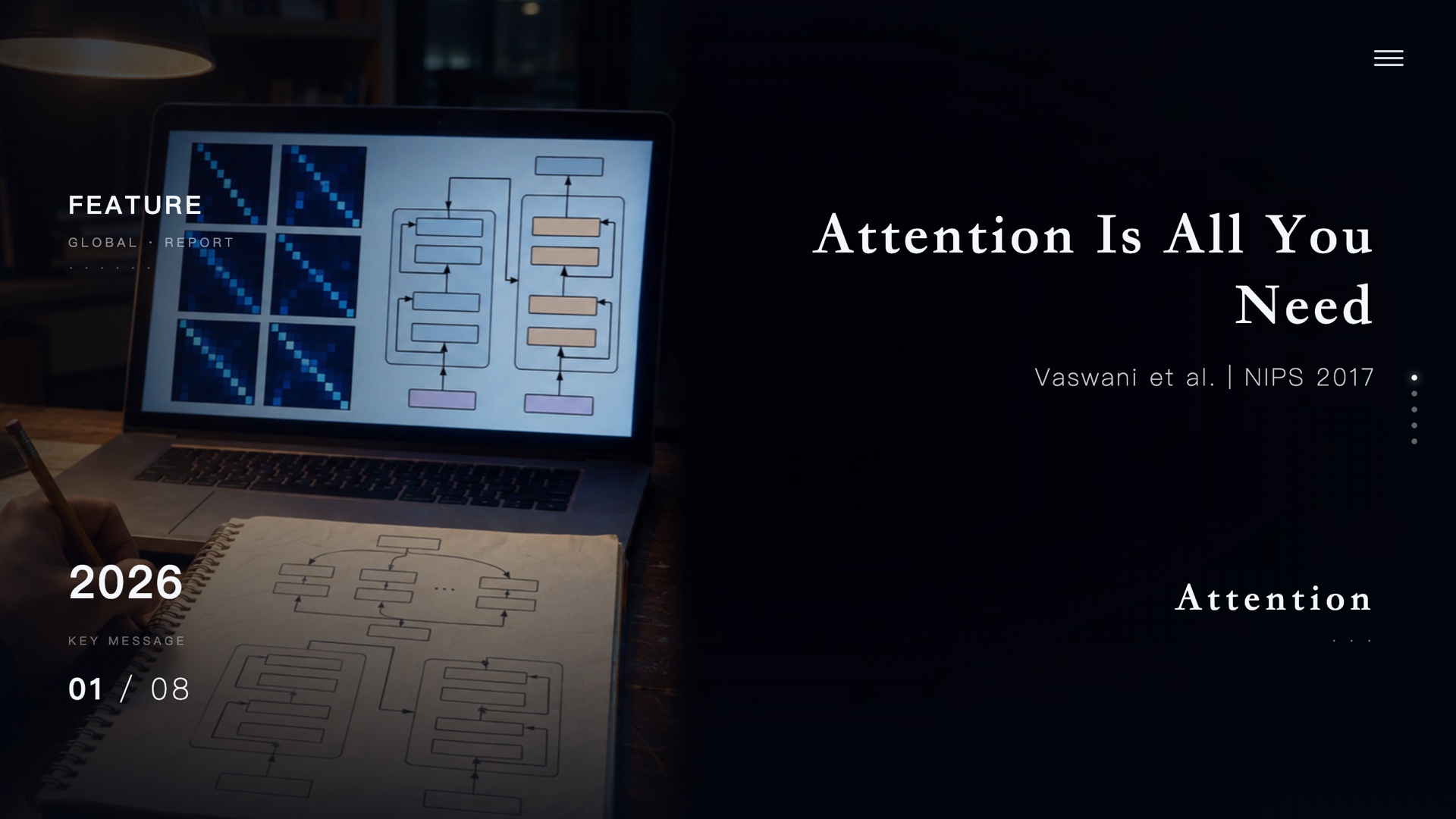
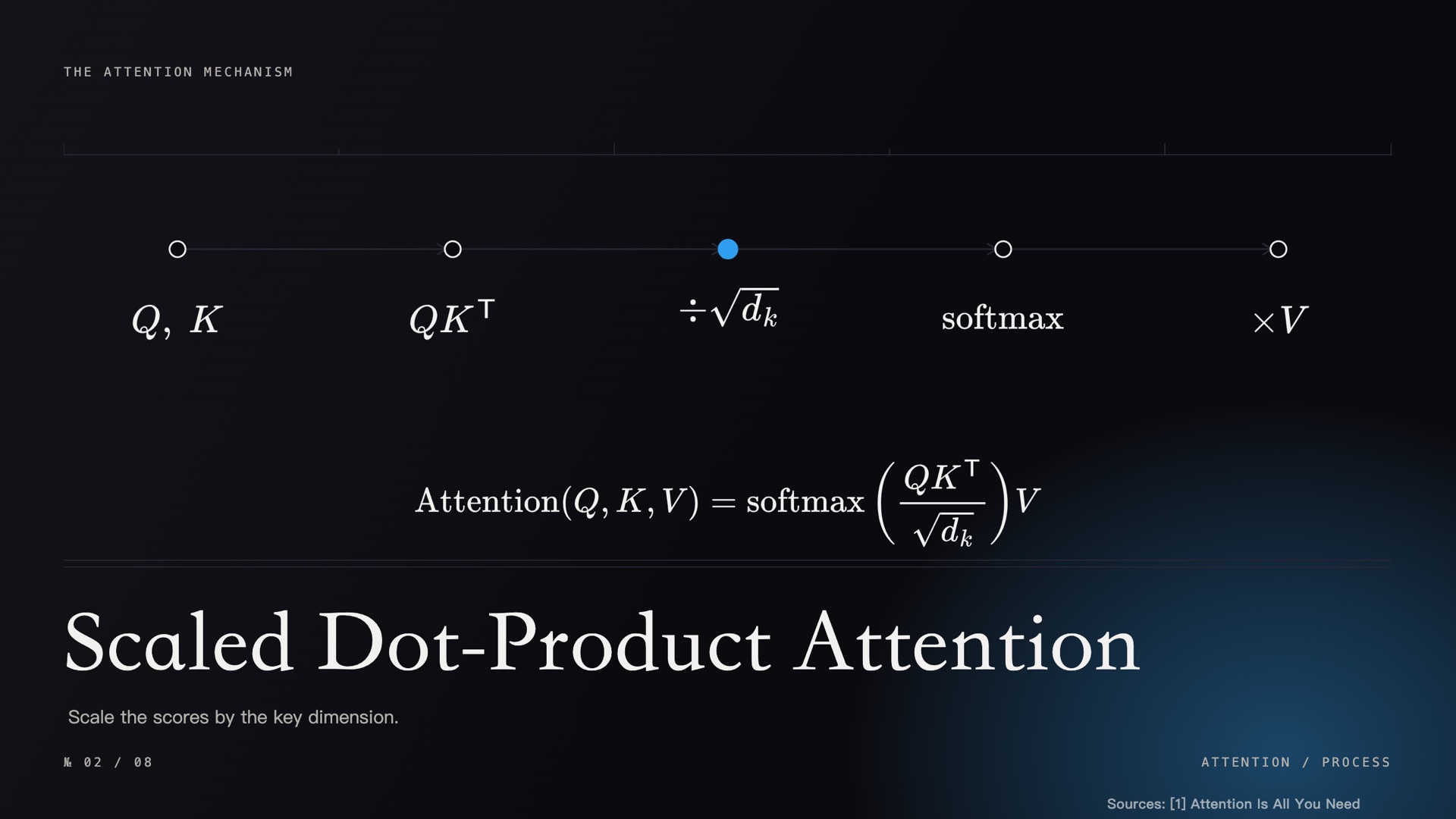
Step two, each page designed from the outline: the test build generated the cover and a page with the Verital design system; for page two we asked “Redo this page” for fewer words and a bigger figure. No retouching. Click to enlarge.
Say what is wrong with a page; only that page is redesigned, with its notes and transitions kept.
Bar, line and box plots come from the table you point at; change the table and the chart follows.
Figures and tables are detected on the PDF page, cropped at high resolution and placed on the slide that talks about them.
Present from the app with speaker notes, or export to PowerPoint and PDF.
Describe how a nephron filters or a synapse fires in one sentence, or give it a paper and it reads the methods and draws that paper’s mechanism. Pick an illustration style per field, from textbook watercolour to engraving, cutaway or isometric. Every label becomes its own editable text, and it stays editable when you export to SVG or PowerPoint.
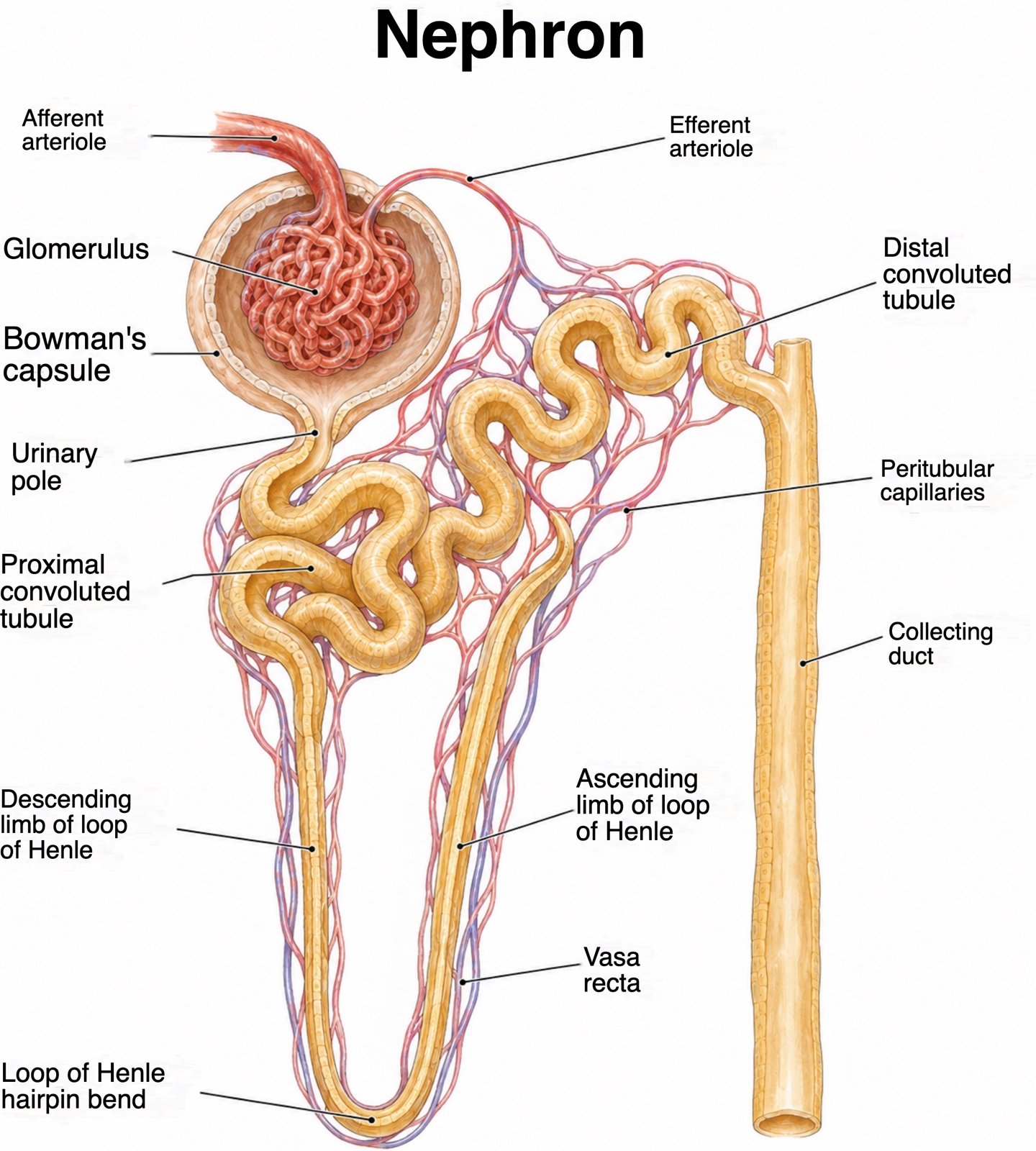
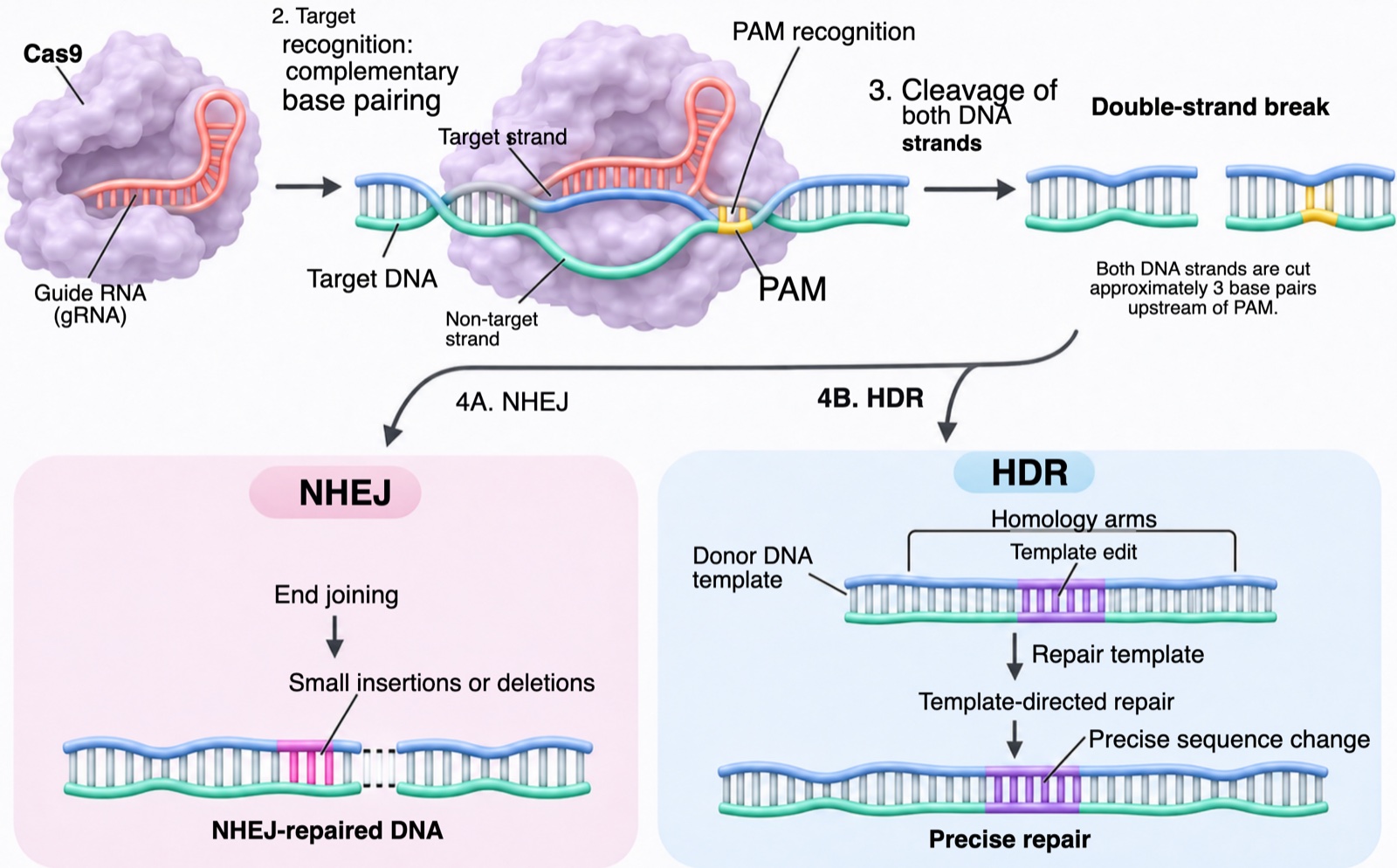
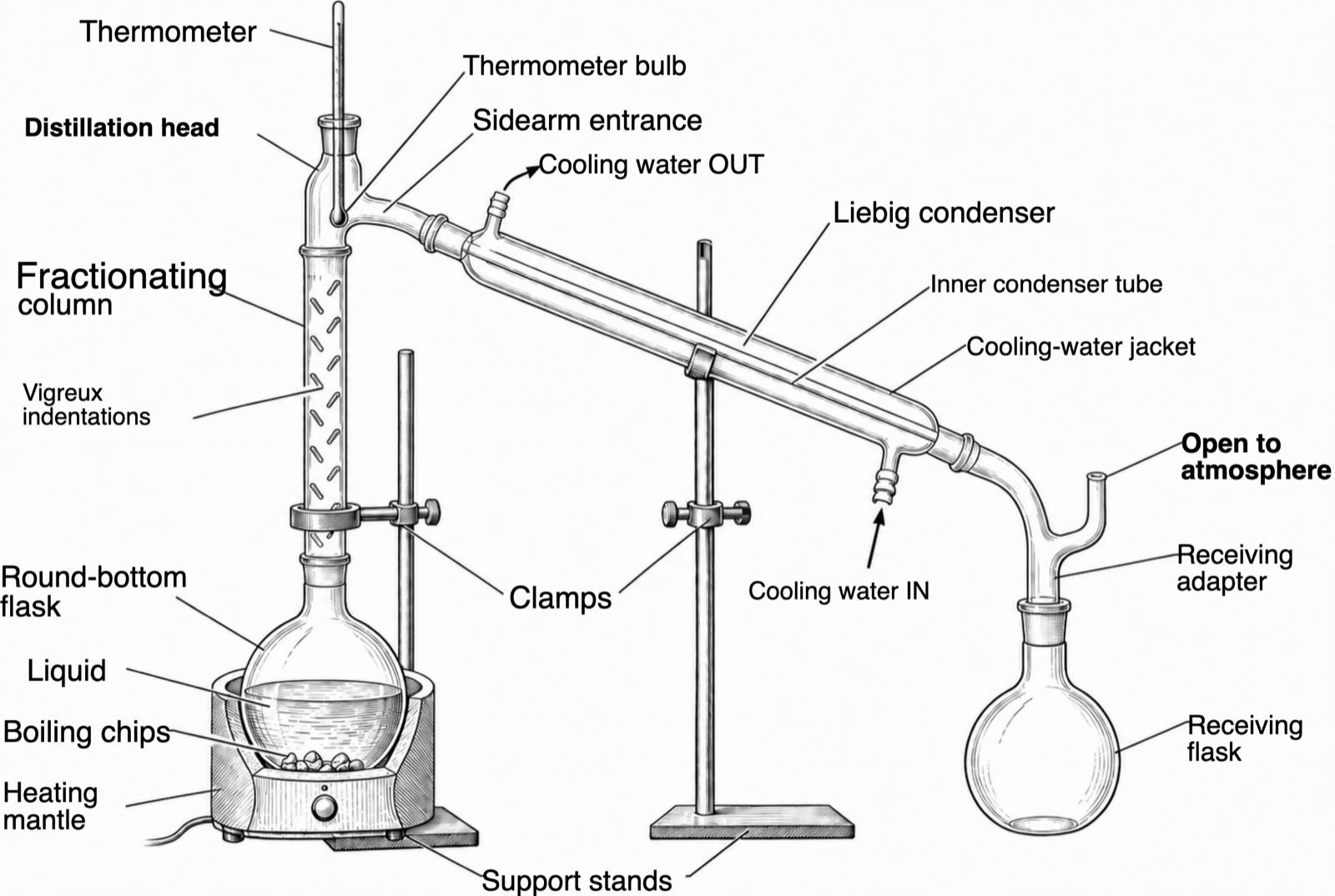
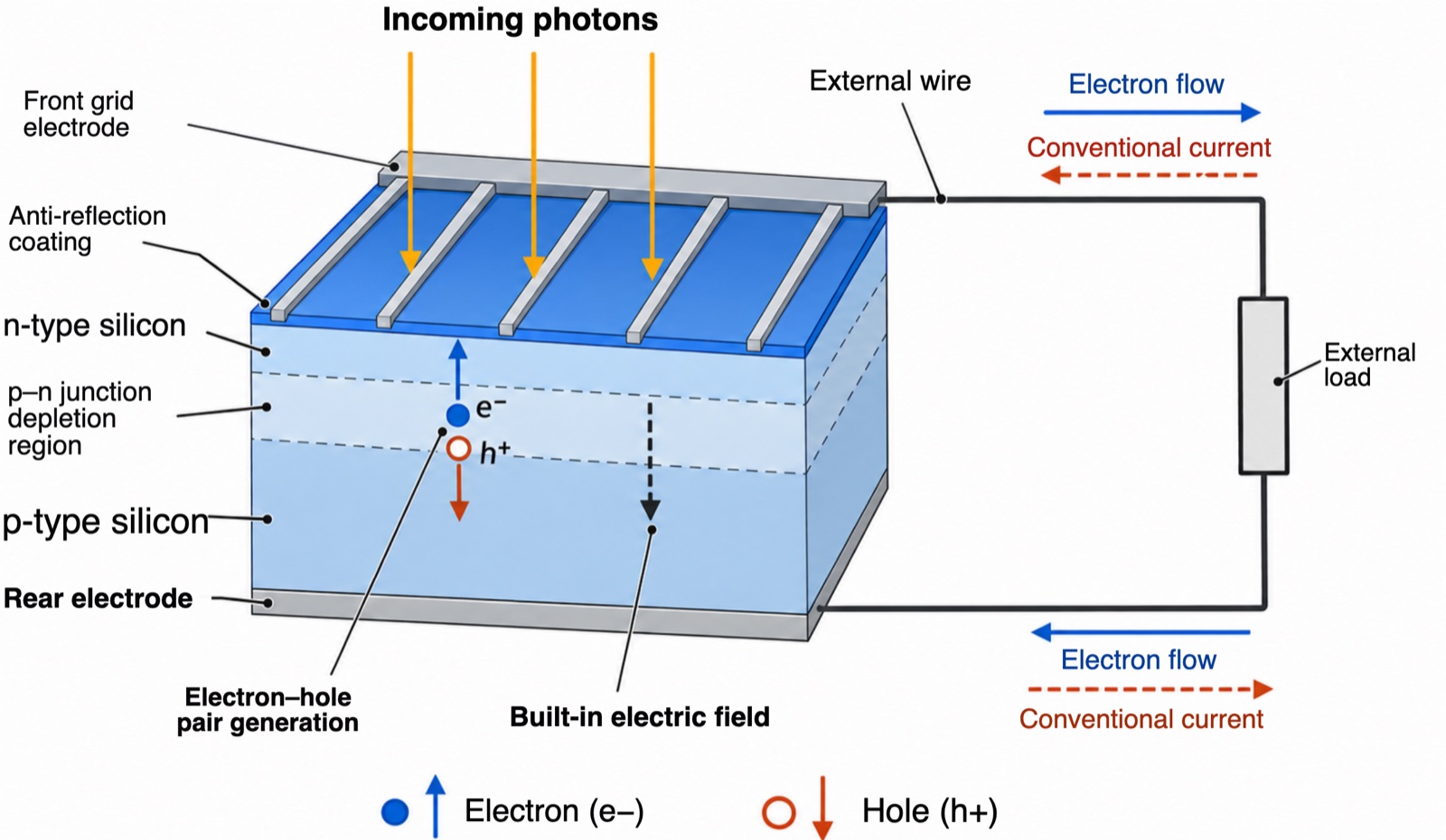
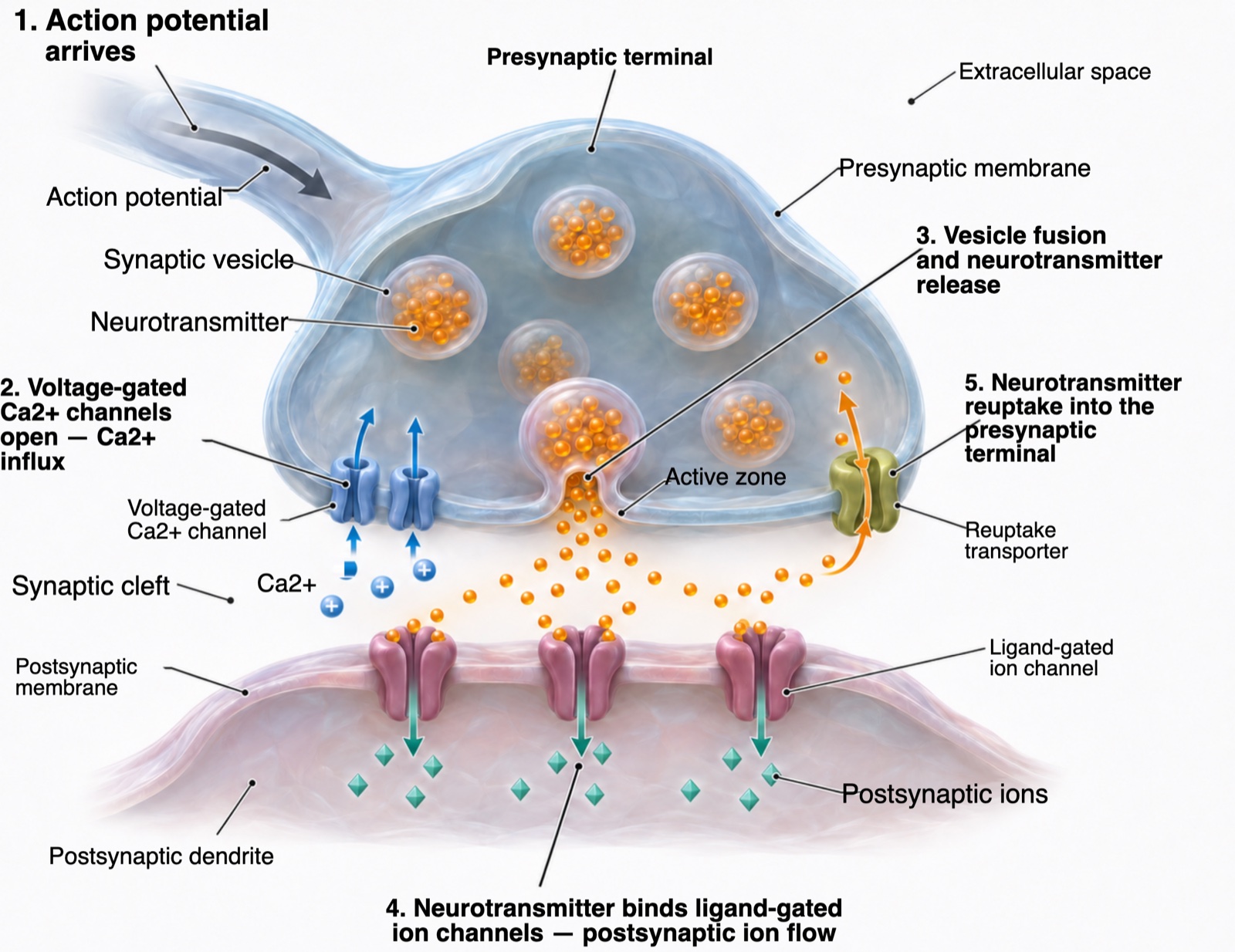
Each drawn by the test build from a one-sentence request, unedited. Click to enlarge.
Import a CSV or Excel file and ask in plain words: filter it, group it, chart it, fit a model. Every step it takes, which table it read, which query it ran, which chart it made, is listed beside it as it happens, and you can roll back to any step.
| species | island | bill_length_mm | bill_depth_mm | flipper_length_mm | body_mass_g | sex |
|---|---|---|---|---|---|---|
| Adelie | Torgersen | 39.1 | 18.7 | 181 | 3750 | male |
| Adelie | Torgersen | 39.5 | 17.4 | 186 | 3800 | female |
| Adelie | Torgersen | 40.3 | 18 | 195 | 3250 | female |
| Adelie | Torgersen | NA | NA | NA | NA | NA |
| Adelie | Torgersen | 36.7 | 19.3 | 193 | 3450 | female |
| Adelie | Torgersen | 39.3 | 20.6 | 190 | 3650 | male |
| Adelie | Torgersen | 38.9 | 17.8 | 181 | 3625 | female |
| Adelie | Torgersen | 39.2 | 19.6 | 195 | 4675 | male |
| Adelie | Torgersen | 34.1 | 18.1 | 193 | 3475 | NA |
| Adelie | Torgersen | 42 | 20.2 | 190 | 4250 | NA |
Your reference library, handwritten notes, old decks, drafts and data: once imported they sit on one desk, the AI can find them, and every quote still points back to where it came from.
Your whole library comes across; an RDF export brings the PDFs too, indexed so the AI can search inside them.
Entries land in the library; \cite autocompletes while you write and every citation is checked.
Handwritten notes arrive with their PDF pages and keep going; import a whole folder at once.
Strokes become erasable, searchable ink, on the same desk as your papers and handouts.
Old decks become editable slides page by page; PDFs exported from NotebookLM work too.
Keep editing in a real docx editor, tracked changes and cross-references intact.
Compiles as is inside the app; export a copy Overleaf opens directly when you need to.
Paste a link: the transcript and text become a source you can cite and click back to.
Into a table, then analyse and chart it in one sentence, every step listed beside it.
Search, writing, review, experiments, figures: each with its own memory and skills. They ask before writing files or running code, and while they work only a ring of light glows in the corner. Your screen stays yours.
Reading chapter 3 and @ the reviewer? They are looking at chapter 3. No pasting.
Running code or writing files brings up an approval card; tick “don’t ask again” for the same kind of thing.
Hand them the coding and experiment stages; everything still goes through our record. Your subscription, your quota.
Send heavy runs to an assistant on another computer; result files come straight back.
python train.py --seed {270001..270007}Drag a slot in the Planner and give it to the Search or Experiment agent: once, or every Friday at 8. It starts on its own, and the result comes back to that slot.
Each task keeps who touched it and what came back; per day you see how many finished, failed or are waiting for you. A failed run stops and waits instead of retrying forever.
Advisor meetings and deadlines live on the same week, so you can see what the agents will have ready before you walk in.
Say what you want to study and talk it through first. Criteria, thresholds and seeds are fixed before any result is seen; when the runs finish it rules pass or fail by itself, and nobody can move the goalposts afterwards. Scroll through the ten stages, or click one.

Where AI goes wrong most often is a citation that looks real. Here every citation has to be found in your library or a public index; anything that can’t be found is held back, and you are told which one.
Because recurrence computes one step at a time and can’t run in parallel; self-attention lets every position see the whole sequence at once[2] p.5, at a cost quadratic in length. Later sparse attention work lowers exactly that cost[7] p.2.
In this section we compare various aspects of self-attention layers to the recurrent and convolutional layers commonly used for mapping one variable-length sequence of symbol representations to another.
The amount of computation that can be parallelized, as measured by the minimum number of sequential operations required. A self-attention layer connects all positions with a constant number of sequentially executed operations, whereas a recurrent layer requires O(n) sequential operations.
The same desk works for classes: textbooks in English, lectures and handwritten notes. Everything it explains still points back to your own material.

Side-by-side translation keeps the layout and formulas; select a paragraph and ask what it is saying.
The blackboard becomes ink you can erase; important course dates go straight into your planner.
Explainer videos, podcasts and flashcards made from the handout and your notes, each part marked with where it came from.
Multiple choice, fill-in, calculation, short answer. Short answers are graded point by point.
Flashcards, quizzes, mind maps, tables and infographics, each generated from your own handouts and notes, each pointing back to the page it came from.
Where does the electron transport chain sit?
| Aerobic respiration | Fermentation | |
|---|---|---|
| Where | mitochondria (after glycolysis) | cytoplasm |
| Needs oxygen | yes | no |
| ATP yield | high | low |
| Products | CO₂ and water | lactate, or ethanol + CO₂ |
The recording, the stroke you wrote at that moment and the slide on screen hang on one timeline. Drag it: your notes write themselves back in at the moment you wrote them.

Drag the timeline or use the arrow keys. Tap the ∂ you wrote and the recording jumps to where the chain rule was explained, with slide 14 on screen.
Drag papers, tables and drafts onto a question card and the assistant can read them; pick a sentence in the answer and keep asking from there.
Papers, recordings, unpublished data: your research, not our training data.
Search, notes, typesetting and the offline speech and recognition models run locally; only cloud models and sync need the network.
Open the same draft in the lab and at home; what you type on one shows up on the other within tens of milliseconds.
Review links and cloud backups are encrypted on your side and the key never passes through us; our usage ledger has no field a prompt could fit in.
Before anything goes to a cloud model, it is de-identified on your computer: rules catch emails, phones, ID and medical-record numbers, dates and URLs, and a local model finds names, organisations and places. The model sees placeholders; the answer comes back with the real text restored. If the local model is not ready, nothing is sent. Turn it on for everything or for a single document.
Your computers, your co-authors and your advisor connect to each other directly. Every keystroke syncs peer to peer; the relay only steps in when someone is offline, and it cannot read what it carries.
Open the same draft in the lab and at home: what you type on one appears on the other within a fraction of a second, straight between the two machines.
Invite a co-author to the paper in LaTeX, Typst, Markdown or Word. The invite link sets their role, the scope and how long it lasts, and you can revoke it any time.
Send one link; your advisor needs no account. The key lives only after the #, so our server cannot read a word. Their edits come back to you as a branch you choose to merge.
With Pro, both sides need to be on at the same time. With Pro+, changes wait in the encrypted relay, so the lab desktop catches up the moment it wakes and a co-author’s edits reach you even when your computers were off.
Every feature is in both. The difference is working with other people and other machines over time: Pro syncs while both sides are online; Pro+ keeps things moving while someone is offline, gives your advisor a month to review, and backs everything up.
| ProUS$20/ monthor US$200 a yearOne main computer; co-authors online at the same time | Pro+US$40/ monthor US$400 a yearLab and home machines, long-running co-authoring, advisor reviews | |
|---|---|---|
| Where Pro+ differs | ||
| Sync while the other side is offchanges wait in the encrypted relay; the lab desktop catches up when it wakes | — | ✓ |
| Advisor review links stay valid fortime for your advisor to read it properly | 7 days | 30 days |
| Encrypted cloud backupa laptop lost or broken is not a thesis lost | — | 5 GB |
| Points for the official AI, each monthmore than twice as many | 150,000 | 320,000 |
| Form responses kept in the cloud for | 30 days | 90 days |
| In both plans | ||
| Peer-to-peer sync and real-time co-authoring while both sides are online | ✓ | ✓ |
| Every feature: writing, slides, figures, data, study, assistants | ✓ | ✓ |
| Bring your own model key (BYOK) | ✓ | ✓ |
| 7-day free trial | ✓ | ✓ |
Tax is added at checkout. Paying yearly costs 10 months. Point packs (US$10 / 45 / 160) last 365 days. Without an active plan the app turns read-only and your data is never deleted. Prices on the checkout page prevail.
Download, sign in, and start with your own papers. The trial needs a card; the first charge is on day 8, and cancelling before that costs nothing.
Verital runs on macOS (Apple silicon and Intel). Open veritalai.com on your Mac to download it.
Verital runs on macOS for now. Leave your email and we will write once, on the day the Windows version is out.
Without a plan your data is never locked: the app still opens, searches, exports and deletes it. Mac: Apple silicon and Intel. Windows: coming to the Microsoft Store.